本文實例為大家分享了Android仿iPhone時間選擇器的具體代碼,供大家參考,具體內容如下
先看效果圖
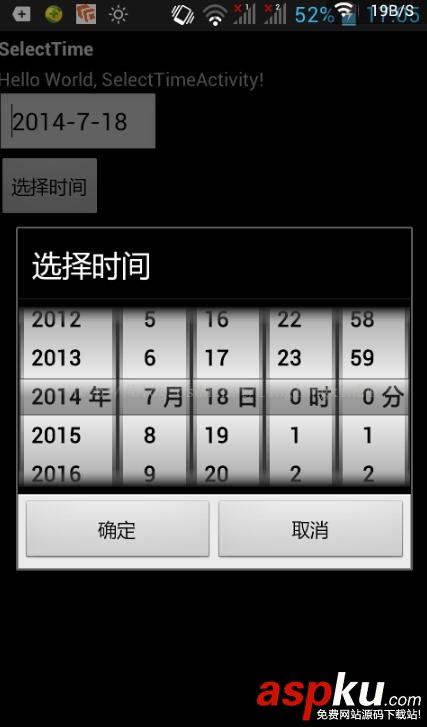
如何使用
import java.text.DateFormat; import java.text.ParseException; import java.text.SimpleDateFormat; import java.util.Calendar; import android.app.Activity; import android.app.AlertDialog; import android.content.DialogInterface; import android.os.Bundle; import android.view.LayoutInflater; import android.view.View; import android.view.View.OnClickListener; import android.widget.Button; import android.widget.EditText; public class MainActivity extends Activity { WheelMain wheelMain; EditText txttime; DateFormat dateFormat = new SimpleDateFormat("yyyy-MM-dd"); @Override public void onCreate(Bundle savedInstanceState) { super.onCreate(savedInstanceState); setContentView(R.layout.main); txttime = (EditText) findViewById(R.id.txttime); Calendar calendar = Calendar.getInstance(); txttime.setText(calendar.get(Calendar.YEAR) + "-" + (calendar.get(Calendar.MONTH) + 1) + "-" + calendar.get(Calendar.DAY_OF_MONTH) + ""); Button btnselecttime = (Button) findViewById(R.id.button1); btnselecttime.setOnClickListener(new OnClickListener() { @Override public void onClick(View arg0) { LayoutInflater inflater = LayoutInflater .from(MainActivity.this); final View timepickerview = inflater.inflate( R.layout.timepicker, null); ScreenInfo screenInfo = new ScreenInfo(MainActivity.this); wheelMain = new WheelMain(timepickerview, true); wheelMain.screenheight = screenInfo.getHeight(); String time = txttime.getText().toString(); Calendar calendar = Calendar.getInstance(); if (JudgeDate.isDate(time, "yyyy-MM-dd")) { try { calendar.setTime(dateFormat.parse(time)); } catch (ParseException e) { // TODO Auto-generated catch block e.printStackTrace(); } } int year = calendar.get(Calendar.YEAR); int month = calendar.get(Calendar.MONTH); int day = calendar.get(Calendar.DAY_OF_MONTH); int h = calendar.getTime().getHours(); int m = calendar.getTime().getMinutes(); wheelMain.initDateTimePicker(year, month, day, h, m); new AlertDialog.Builder(MainActivity.this) .setTitle("選擇時間") .setView(timepickerview) .setPositiveButton("確定", new DialogInterface.OnClickListener() { @Override public void onClick(DialogInterface dialog, int which) { txttime.setText(wheelMain.getTime()); } }) .setNegativeButton("取消", new DialogInterface.OnClickListener() { @Override public void onClick(DialogInterface dialog, int which) { } }).show(); } }); } } 源碼下載:仿iPhone日期時間選擇器
以上就是本文的全部內容,希望對大家的學習有所幫助,也希望大家多多支持VEVB武林網。
新聞熱點






疑難解答